
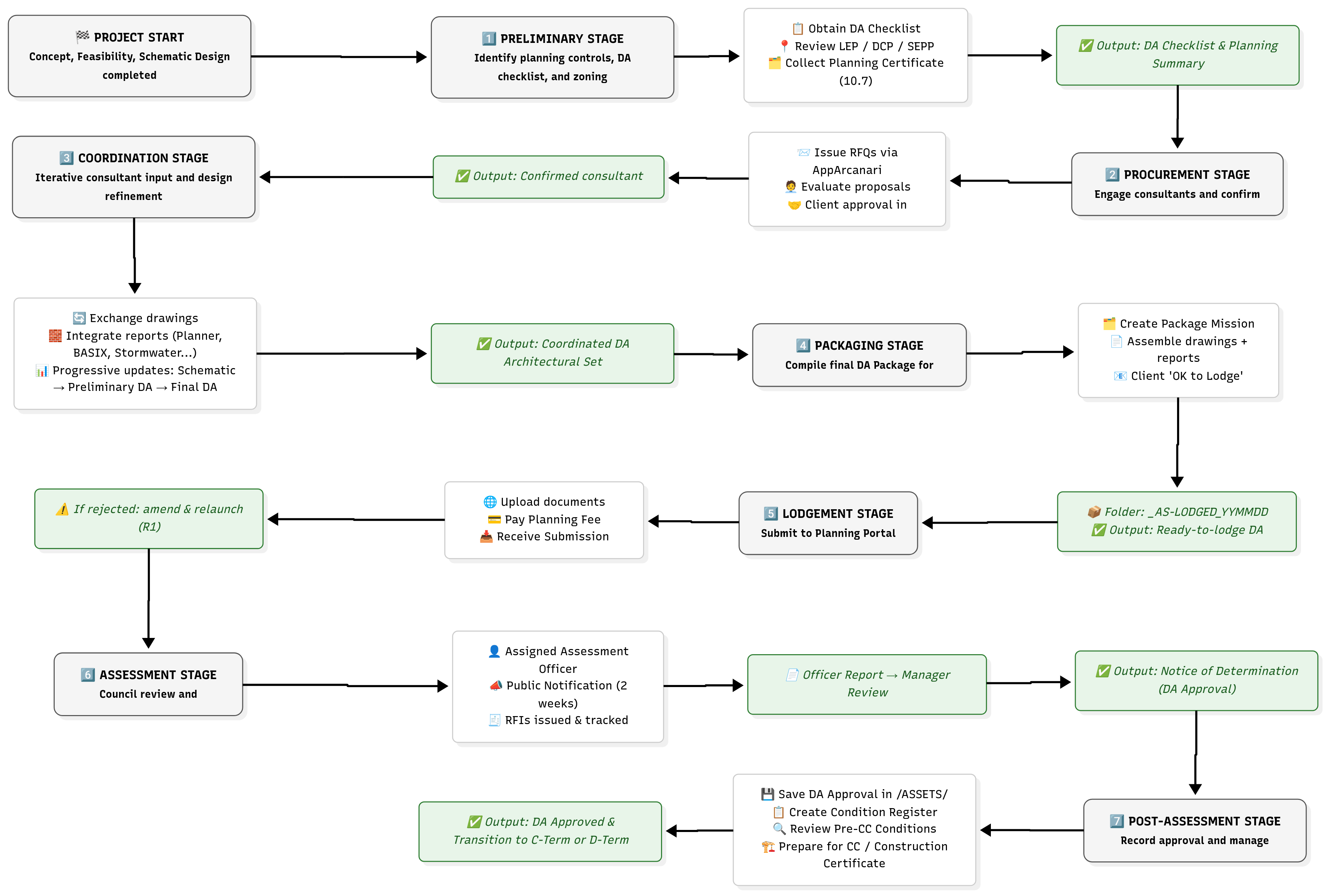
🔹 Overview
A Development Application (DA) is a formal request for planning consent to carry out development.
It seeks approval from the relevant local authority for the proposed use, design, and built form of a project.
DA approval confirms that the concept and design are acceptable in principle under planning controls — but it does not authorize construction.
Following DA approval, the project proceeds to the Construction Certificate (CC) stage, where technical compliance is demonstrated.
⚙️ Structure of the DA Process
The DA process in Arcanary is divided into seven substages, aligning with the broader B-Term (Design) lifecycle:
| Sub-Stage | Objective | Output |
|---|---|---|
| 1. Preliminary | Identify controls, site data, and documentation requirements | DA Checklist & Planning Overlays |
| 2. Procurement | Engage consultants and prepare RFQs | Confirmed Consultant Team |
| 3. Coordination | Integrate consultant input and develop DA documentation | Coordinated DA Architectural Set |
| 4. Packaging | Assemble all drawings, reports, and forms | Final DA Package (Ready for Lodgement) |
| 5. Lodgement | Upload and formally lodge DA | Council Receipt & Reference Number |
| 6. Assessment | Respond to Council’s review and RFIs | Determination (Approval / Refusal) |
| 7. Post-Assessment | Record approvals and address conditions | DA Condition Register & Transition to CC |
🧩 1. Preliminary Stage
Objective
Establish the planning context, define documentation requirements, and prepare the groundwork for the DA submission.
Key Actions
- Obtain the Current DA Checklist from the local council.
- Identify Planning Controls using:
- NSW Planning Portal overlays (zoning, height, FSR, heritage, flood, bushfire, etc.)
- Section 10.7 Planning Certificate
- LEP (Local Environmental Plan)
- DCP (Development Control Plan)
- SEPP / State Environmental Planning Policies (e.g., Coastal, BASIX, Bushfire).
- Discuss DA Checklist with the Office Manager or senior team member to validate required consultants.
- Prepare a Preliminary Scope Description (site data, zoning, project use, existing conditions).
Best Practices
- Use the Planning Portal Map Viewer to cross-check zoning and overlays.
- Keep a Pre-DA folder for zoning maps, LEP extracts, and any pre-lodgement notes.
- Record all findings in the AppArcanari mission
DA_PRELIM.
Deliverables
- DA Checklist
- Planning Certificate (10.7)
- LEP / DCP Extracts
- Pre-DA Summary Sheet
💼 2. Procurement Stage
Objective
Engage the right consultants and confirm all required documentation scopes.
Workflow
- Create RFQ Mission in AppArcanari – one per consultant discipline.
- Prepare Scope of Works & share preliminary drawings.
- Send RFQs to 2–3 consultants per discipline (Planner, Stormwater, BASIX, etc.).
- Track Responses, prices, and notes inside the mission.
- Summarize Recommendations and share with the client via the Client Portal.
- Obtain Client Approval in Writing and notify unsuccessful consultants.
- Engage and Mobilize Consultants, ensuring contracts and deposits are processed.
Checklist
- RFQ issued for each discipline
- Client approval email saved
- Consultant contracts signed
- All documentation archived under
/03_COORDINATION/DA/RFQ/
Best Practices
- Call consultants immediately after sending RFQs.
- Record negotiation notes in mission comments.
- Never start coordination until consultant engagement is confirmed.
🔁 3. Coordination Stage
Objective
Integrate consultant input, refine the architectural design, and align all documentation before final DA issue.
Process Characteristics
- Iterative and non-linear — consultants provide information at different times.
- Town Planner leads early, Cost Report & SEE typically arrive last.
- Architect acts as central coordinator.
Coordination Milestones
| Milestone | Description | Outcome |
|---|---|---|
| Schematic Design Issue | Initial coordination set | Early feedback from consultants |
| Preliminary DA Package | Updated design and early reports | Review with planner and client |
| Preliminary Revision | Responses integrated | Near-final geometry |
| Final DA Package (Pre-Lodgement) | Complete coordinated documentation | Ready for QA & packaging |
Information Requirements per Consultant
- Planner: All plans + SEE draft
- BASIX/NatHERS: Openings schedule, materials, construction method
- Stormwater Engineer: Site plan, levels, roof areas
- Landscape: Site plan, finishes, vegetation
- Arborist / Traffic / Heritage: Specific data per discipline
Best Practices
- Maintain a shared Consultant Folder in AppArcanari per discipline.
- Log every coordination issue as a Comment or Task with revision reference.
- Ensure each coordination issue has a closure note before packaging.
📦 4. Packaging Stage
Objective
Assemble all documents into a complete, reviewed, and ready-to-submit DA Package.
DA Package Mission Setup
- Create a new Package Mission in AppArcanari.
- Organize Items by Realm and Discipline (00 General, 02 Site, 03 Architecture, etc.).
- Each Item links to its Stakeholder.
- Include a Docs subfolder for drafts, finals, and issued versions.
Folder Example
DA_PACKAGE_240303/
├── 00_GENERAL/
├── 02_SITE/
├── 03_ARCHITECTURE/
├── 05_LANDSCAPE/
├── 07_ENVIRONMENTAL/
└── 09_ADMIN/
Quality Control
- Verify file naming follows
_PROJECTCODE_SUBSET_REV_DATE.pdf - Confirm inclusion of all mandatory documents:
- Architectural drawings
- Statement of Environmental Effects
- BASIX certificate
- Cost report
- DA Checklist
- Owner’s consent
- Run internal QA before client release.
Client Approval
- Send email with link to package.
- Receive client’s written “OK to lodge.”
- Create folder
_AS-LODGED_YYMMDDand copy final PDFs there.
Office Manager Review
- Perform last QA check.
- Approve via email to Project Manager.
- Authorize upload to Planning Portal.
🌐 5. Lodgement Stage
Objective
Submit the DA Package to the relevant authority for official registration.
Pre-Assessment Phase
- Council verifies completeness and formatting.
- If accepted → Invoice issued (planning fee) → DA formally lodged.
- If rejected → revise per feedback and resubmit as
_AS-LODGED_YYMMDDR1.
Checklist
- All required forms uploaded
- Fee invoice paid
- Submission receipt saved in
_AS-LODGED_YYMMDD - Mission status set to Lodged
🧾 6. Assessment Stage
Objective
Respond to Council’s review, manage RFIs, and guide the project to determination.
Process
- Allocation
- DA assigned to an Assessment Officer.
- Record officer’s name and contact in Stakeholders – 00 General.
- Send courtesy introduction email.
- Public Notification
- Usually two weeks.
- Monitor for objections.
- Active Assessment
- Council reviews documents, issues RFI if clarification needed.
- Log each RFI as a new mission in AppArcanari:
- Items per discipline
- Docs subfolders for letters, responses, and revised drawings.
- Consultant Variations
- Manage quick mini-RFQs for any required additional work.
- Obtain client approval before instructing consultants.
- Response & Re-Lodgement
- Prepare cover letter summarizing responses.
- Upload revised documents via Planning Portal (Request for Additional Information).
- Track council’s acceptance or new feedback.
- If amendments are major → possible withdrawal & re-lodgement.
- Determination
- Officer finalizes report → reviewed by Council Manager → Notice of Determination issued (Approval or Refusal).
- Save under
/07_DETERMINATION/_AS-DETERMINED_YYMMDD/.
✅ 7. Post-Assessment Stage
Objective
Record approval, review conditions, and prepare for the next term (CC / Construction).
Actions
- Save Determination
- Store Notice of Determination in
/ASSETS/DA_APPROVAL/and/07_DETERMINATION/.
- Store Notice of Determination in
- Create Condition Register
- List each condition, responsible party, and timing (Pre-CC, Pre-OC, etc.).
- Brief the Client
- Summarize required actions and payments.
- Transition
- Start C-Term (Coordination) or D-Term (Development) missions for technical documentation.
Best Practices
- Treat DA Approval as confirmation of design acceptance, not construction permission.
- Verify that all “Prior to CC” conditions are resolved before starting technical drawings.
- Keep the client informed of expected timelines for CC issue.
🧭 Summary of Deliverables by Stage
| Stage | Core Deliverables |
|---|---|
| Preliminary | DA Checklist, 10.7 Certificate, Planning Overlays |
| Procurement | RFQs, Consultant Approvals, Contracts |
| Coordination | Iterative DA Drawings, Consultant Reports |
| Packaging | Final DA Package & QA Report |
| Lodgement | Portal Submission & Fee Receipt |
| Assessment | RFI Missions, Correspondence Log |
| Post-Assessment | Notice of Determination, Condition Register, Assets Archive |
🧱 Core Principles
- Clarity: Maintain transparent records of all versions and communications.
- Presence: Keep clients and consultants updated fortnightly.
- Iterations: Improve progressively — every issue, set, or mission should increase certainty.
- Source of Truth: AppArcanari missions, items, and docs folders are the definitive reference for all project documentation.
- Naming Consistency: Always use
_AS-LODGED_YYMMDD,_RFI_YYMMDD, and_AS-DETERMINED_YYMMDDfor version control.