
I have updated the guide to remove the blank lines between all list items for a tighter, more concise format.
How to Use This Guide
This guide defines how information is encoded at Arcanary.
It applies to:
- models
- files
- documents
- folders
- drawings
- spatial structures
- elements and materials
It is not software-specific and not project-specific.
It describes a way of thinking that allows information to remain:
- consistent
- searchable
- scalable
- and understandable over time.
You can read this guide:
- top to bottom to understand the full system, or
- by section as a reference during production.
If something is named correctly, it is already organised correctly.
1. Arcanary Standards (AVG Standards)
1.1 Why Standards Exist
At Arcanary, standards are not about control or rigidity.
They exist to remove ambiguity, reduce friction, and allow people to focus on design and delivery instead of administration.
Without standards:
- information gets duplicated
- naming becomes subjective
- onboarding becomes slow
- automation becomes impossible
- errors repeat silently
With standards:
- decisions are encoded once
- structure replaces memory
- quality becomes predictable
- teams scale without chaos
Standards are not constraints.
They are shared agreements.
1.2 One Source of Truth
A core principle at Arcanary is the concept of a Source of Truth.
For any piece of information:
- there must be one authoritative place
- everything else must reference or derive from it
- duplication is avoided unless explicitly justified
This applies equally to:
- geometry
- metadata
- documents
- schedules
- specifications
If information exists in more than one place, one of them must clearly be wrong.
1.3 Derivation Over Duplication
Whenever possible, information should be:
- derived, not copied
- inferred, not restated
- linked, not repeated
For example:
- spatial hierarchy is derived (Room → SOU → Level → Building)
- document status is derived from issue history
- material intent is derived from host systems
This principle keeps the system:
- lighter
- more robust
- easier to change
1.4 Thinking Alphanumerically
Everything at Arcanary is designed to be understood alphanumerically first.
This means:
- names are composed of fields, not prose
- field order is intentional
- alphabetical and numerical sorting is expected, not accidental
Software always sorts A–Z.
If your structure does not respect that, software will eventually win — and not in your favour.
Alphanumeric thinking is applied to:
- element codes
- material codes
- drawing numbers
- file names
- document names
- folder structures
This is not an aesthetic choice.
It is information architecture.
1.5 Codes vs Names
A fundamental distinction in this system is between codes and names.
- Codes
- compact
- space-free
- machine-readable
- used for elements, materials, drawings
- Names
- human-readable
- composed of multiple fields
- fields separated by space – dash – space
- used for folders, files, and documents
If this distinction is respected, clarity follows naturally.
1.6 Consistency Over Preference
Individual preferences do not scale.
Shared systems do.
At Arcanary:
- standards apply across offices
- standards apply across projects
- standards apply across roles
Consistency is more valuable than local optimisation.
The goal is not to be clever.
The goal is to be predictable.
1.7 What This Guide Is (and Is Not)
This guide:
- is a living reference
- is practical and production-oriented
- is designed to support automation and QA
- is not a software manual
- is not a style guide
- is not project-specific
It defines how Arcanary encodes information, regardless of tool or scale.
2. Terms, Statuses & the Project Lifecycle
Before we name objects, drawings, files, or documents, we must first be clear about time and intent.
At Arcanary, this is handled through Terms and Statuses.
They are deliberately simple, because they underpin everything else.
2.1 Terms: Defining the Project Lifecycle
A Term represents a distinct phase in the life of a project.
Terms are not versions, not deliverables, and not contractual labels.
They are a way of describing where the project is in time.
Arcanary uses a fixed, letter-based system:
| Term | Name | Purpose |
| A | Analysis | Feasibility, due diligence, early testing |
| B | Design | Design development and planning approval |
| C | Coordination | Technical coordination and construction approval |
| D | Construction | Construction support and delivery |
| E | Usage | Post-construction use and lifecycle |
These terms are:
- sequential
- non-overlapping
- universally understood across the practice
A project always moves forward through terms, even if it loops internally.
2.2 What Terms Are Used For
Terms are used to:
- structure documentation sets
- define drawing numbering resolution
- clarify intent when issuing documents
- separate early design thinking from technical commitments
Terms are not used to:
- name working files
- define folders
- encode element states
- replace dates or revisions
This separation avoids confusion between process and production.
2.3 One Term, One Output
A critical rule at Arcanary is:
Every issued document belongs to one, and only one, term.
This means:
- a PDF set is always a snapshot of a specific term
- documents never mix A-term and B-term intent
- later terms do not overwrite earlier ones
Files may evolve across terms.
Documents do not.
2.4 Statuses: Defining Intent, Not Time
While Terms define when something exists in the project lifecycle,
Statuses define what we intend to do with it.
Statuses are descriptive, not hierarchical.
Typical statuses include:
- WIP (Work in Progress)
- Draft
- For Review
- For Approval
- Issued
- Superseded
Statuses:
- apply to documents and folders
- help people understand reliability at a glance
- do not replace revision control
- do not replace dates
A status is a signal, not a history.
2.5 Status vs Revision vs Version
These three concepts are often confused. At Arcanary, they are distinct:
- Version
- applies to editable files
- numeric (01, 02, 03…)
- internal working control
- Date
- applies to issued documents
- represents the document version
- immutable once issued
- Revision
- applies to documents
- alphabetic (Rev A, Rev B…)
- used when a document is formally revised
- Status
- applies to folders or documents
- describes intent (Draft, Issued, etc.)
- optional and contextual
Keeping these separate avoids ambiguity and rework.
2.6 What Terms and Statuses Do Not Do
To keep the system clean:
- Terms are not embedded in element or material codes
- Statuses are not embedded in codes or drawing numbers
- Revisions are not used for internal working files
- Dates are not used in file names
Each concept has exactly one role.
2.7 Why This Matters
Clear separation of:
- time (Terms),
- intent (Statuses),
- change (Versions / Revisions),
means that:
- teams know what they are looking at
- mistakes are caught earlier
- automation becomes possible
- historical information remains trustworthy
Most project confusion comes from mixing these concepts.
This system avoids that by design.
3. Realms
Once time and intent are clearly defined through Terms and Statuses, the next question is:
Where does information belong?
At Arcanary, the answer is handled through Realms.
3.1 What a Realm Is
A Realm is a domain of information.
It is not:
- a discipline title
- a consultant name
- a contractual scope
- a file type
A Realm answers a simpler, more fundamental question:
What kind of information is this?
Realms allow information to be:
- grouped consistently
- found quickly
- reused safely
- scaled across projects
3.2 Why Realms Are Numeric
Realms are intentionally:
- numeric
- zero-padded
- ordered
For example:
03 Architecture
04 Interiors
06 Services
This is not cosmetic.
Numeric realms:
- sort correctly in all systems
- remain stable over time
- allow new realms to be inserted without disruption
- work equally well for folders, files, models, and schedules
Names may change.
Numbers must not.
3.3 The Canonical Realm List
Arcanary uses a fixed, practice-wide list of realms.
| Code | Realm |
| 00 | Airband |
| 01 | Site |
| 02 | Context |
| 03 | Architecture |
| 04 | Interiors |
| 05 | Structure |
| 06 | Services |
| 07 | Landscape |
| 08 | Compliance |
| 09 | External |
This list is:
- shared across all offices
- consistent across all projects
- treated as a controlled vocabulary
New realms are added only deliberately, not ad hoc.
3.4 Realms vs Disciplines
A Realm is broader than a discipline.
For example:
- Services is a Realm
- Mechanical, Electrical, Fire, Hydraulic are disciplines within it
- Compliance is a Realm
- Town Planning, Traffic, Fire Engineering are disciplines within it
This distinction is important because:
- disciplines change from project to project
- realms remain stable
Realms create structural order;
disciplines add descriptive detail.
3.5 Where Realms Are Used
Realms appear consistently across the entire system:
- Project folders
- File names
- Models
- Documentation packages
- Schedules and exports
Examples:
03 – Architectural Documentation
PMQ38 O3 Architecture Main Model 05 MGP
06 Services Mechanical Specifications
Because the realm is always first, information naturally groups when sorted.
3.6 What Realms Do Not Encode
To avoid overload, realms do not encode:
- project phase (A, B, C, D)
- status (WIP, Issued)
- authorship
- versioning
Those concepts are handled elsewhere.
A Realm does one job only.
3.7 Realms and Alphanumeric Thinking
Realms are a practical expression of alphanumeric thinking:
- stable numbers first
- descriptive text second
- no ambiguity in sorting
- no reliance on memory
If two people independently place information into the correct realm,
they will end up in the same place — without coordination.
That is the mark of a good system.
3.8 Common Mistakes to Avoid
- Creating project-specific realms
- Using consultant names instead of realms
- Mixing multiple realms in one folder or file
- Encoding scope or phase into the realm name
If information seems to “not fit” a realm, the issue is usually scope clarity, not the realm system.
4. Project – General Structure
Before any modelling, documentation, or production begins, every project at Arcanary is set up using a consistent, predictable structure.
This structure is not optional.
It ensures that:
- information is always in the expected place
- projects are navigable by anyone in the practice
- onboarding is immediate
- automation and QA are possible
4.1 The Project Root Folder
Every project starts with a single root folder, named using a fixed convention:
PROJECT NUMBER – PROJECT NAME – PROJECT CODE
Example:
24038 – 38 Shelley Beach Road – PMQ38
Each part has a clear role:
- Project Number
- unique identifier
- used for tracking and administration
- Project Name
- human-readable
- recognisable externally
- Project Code
- short internal reference
- used in file naming and models
This combination balances:
- clarity
- brevity
- uniqueness
4.2 Fixed First-Level Project Folders
Inside the project root, a standard set of folders always exists, regardless of project size, type, or location.
These folders are:
- created at project inception
- identical across all projects
- never renamed or reordered
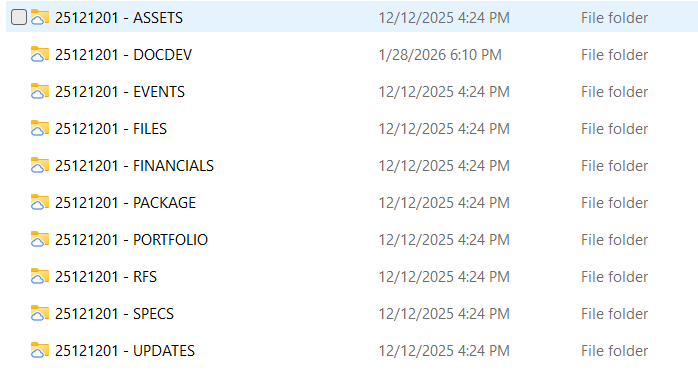
This consistency:
- eliminates guesswork
- reduces training time
- allows instant orientation across projects
People should never ask “where would this live?”
The answer should already be obvious.
4.3 Project Folders vs Production Folders
It is important to distinguish between:
- Project-level folders (fixed, structural, long-lived)
and
- Production / information folders (created as needed to host content)
Project-level folders define function.
Production folders define domain and responsibility.
4.4 Realm-Based Production Folders
When creating folders to host information — such as:
- specifications
- consultant documentation
- authority submissions
- coordination packages
—we always start with the Realm.
General structure:
REALM – DISCIPLINE – [STAKEHOLDER] – [METADATA]
Each field is separated using:
space – dash – space
4.5 Realm (Always First)
The Realm is the primary sorting key.
Example:
03 – Architectural Documentation
06 – Services Mechanical
08 – Compliance Town Planning
This ensures:
- alphanumeric order
- cross-project consistency
- predictable navigation
Realm comes before discipline, author, or status — always.
4.6 Discipline (Descriptive Layer)
The Discipline clarifies the nature of the information within the realm.
Examples:
- Architecture
- Mechanical
- Electrical
- Fire
- Landscape
- Town Planning
- Traffic
Discipline names are:
- descriptive
- human-readable
- flexible within the realm structure
4.7 Stakeholder / Author (Optional)
When relevant, the stakeholder or author may be included.
This is typically used for:
- consultant-provided information
- externally authored documentation
Examples:
06 – Services Mechanical – WSP
08 – Compliance Town Planning – Ethos
Rules:
- optional
- never replaces the discipline
- never used on its own
4.8 Additional Metadata (Optional)
Additional metadata may be appended only when useful at folder level.
Examples:
- Status (WIP, Issued)
- Purpose (DA, CC)
- Review state
Example:
03 – Architectural Documentation – Arcanary – WIP
08 – Compliance Town Planning – DA
Folder-level metadata should remain:
- broad
- stable
- meaningful over time
Granular metadata belongs in file names or document names, not folders.
4.9 What Folder Names Do Not Include
To keep the structure clean, folder names do not include:
- dates
- versions
- drawing numbers
- element codes
- term letters (A, B, C, D)
Those concepts belong elsewhere in the system.
4.10 Why This Structure Works
This approach:
- scales from small to very large projects
- works across offices and time zones
- supports automation and permissions
- survives staff turnover
- remains readable years later
Most importantly, it allows everyone to think less about structure and more about content.
4.11 Transition
With the project structure defined, we can now focus on what we actually produce.
That means:
- documentation types
- sets and drawings
- files and documents
- and how outputs are named and controlled
5. Documentation
With the project structure in place, we can now define what Arcanary produces and how outputs are identified and controlled.
In this guide, documentation refers to deliverables, not working material.
It is distinct from:
- folders (which organise information),
- files (which are editable containers),
- and models (which are sources of data).
Documentation is issued, referenced, and relied upon.
5.1 Documentation Types
Arcanary distinguishes documentation by type, based on purpose rather than format.
The canonical document types are:
- Drawings Graphical representations of the project
- Sets Curated groups of drawings issued together
- Reports Analytical or technical written documents
- Schedules Tabulated outputs derived from data
- Statements Formal declarations (e.g. Design Statement)
- Presentations Visual communication documents
- Admin Documents Contractual or administrative material
This classification clarifies expectations before naming begins.
5.2 Sets
A Set is a structured collection of drawings issued together for a specific term and purpose.
Examples include:
- Architectural Set
- Coordination Set
- Construction Set
A set:
- always belongs to one term
- contains drawings from one or more subsets
- is the primary unit of issue for drawings
5.2.1 Set Naming Convention
Set names are human-readable and follow this structure:
TERM – SET NAME
Examples:
A – Architectural
B – Architectural
C – Coordination
D – Construction
Set names are used in:
- cover sheets
- transmittals
- document registers
They are not drawing numbers.
5.3 Drawings
A Drawing is a single, uniquely identified graphical document.
Every drawing:
- belongs to one set
- belongs to one subset
- is identified by a drawing number
5.3.1 Drawing Number Structure
The canonical drawing number format is:
DISCIPLINE – SUBSET.SEQUENCE
Where:
- DISCIPLINE identifies the primary authoring discipline
- SUBSET identifies the drawing type
- SEQUENCE identifies the drawing within that subset
This structure is stable across all terms.
5.3.2 Sequence Resolution by Term
The level of detail increases as the project progresses.
This is reflected in the length of the sequence number.
| Term | Sequence Format | Typical Use |
| A | 1 digit | Early concept |
| B | 2 digits | Design / Planning |
| C | 4 digits | Coordination |
| D | 4 digits | Construction |
The subset code remains unchanged.
Only the resolution of the sequence increases.
Example:
A-10.0000
This avoids renumbering while allowing the drawing set to scale.
5.4 Files (Editable Containers)
A File is an editable working container used to produce documentation.
Files:
- may span multiple terms
- evolve through versions
- are controlled internally
They are not issued directly.
5.4.1 File Naming Convention
File names are structured fields, separated by double spaces, and follow this order:
PROJECT CODE – REALM – FILE NAME – VERSION – AUTHOR – [COMMENT]*
Example:
38.SHB.R – 03 – ARCHITECTURE – 34 – MGP – Temp for testing
Key principles:
- project code is used internally
- File name is in capitals
- realm groups files logically
- version is numeric and sequential
- author is last, to avoid fragmentation
- *last field is optional if needed to provide additionally info about the usage of the file
Dates and terms are not used in file names.
5.5 Documents (Issued Outputs)
A Document is a non-editable output derived from one or more files.
Typical formats:
- Image
- Video
Documents are:
- issued
- referenced externally
- controlled by date and revision
5.5.1 Document Naming Convention
Document names are composed of explicit fields, separated by space – dash – space:
PROJECT NAME – TERM – DOCUMENT TITLE – DATE(.ISSUE) – [STATUS]* – [REVISION]*
Example:
38 Shelley Beach Road – B – Architectural Drawings – 240918 – Issued – Rev A
5.5.2 Date as Version
For documents:
- the date is the version
- formatted as YYMMDD
- immutable once issued
If multiple documents are issued on the same day:
240918.1
240918.2
5.5.3 Status and Revision
- Status clarifies intent (Draft, Issued, For Review)
- Revision records formal changes (Rev A, Rev B)
Statuses do not replace revisions.
Revisions do not replace dates.
Each has a distinct role.
5.6 What Documentation Naming Does Not Include
To keep responsibilities clear, documentation names do not include:
- working file versions
- author initials
- realm codes
- element or material codes
Those belong elsewhere in the system.
5.7 Why This Matters
Clear documentation conventions ensure that:
- issued information is unambiguous
- history is traceable
- teams know what is current
- external parties are not confused
Most documentation issues arise not from drawing quality, but from unclear identification.
This system prevents that.
6. Spatial
If documentation defines what we issue,
spatial definitions explain where things exist and who they belong to.
Spatial structure is fundamental because it:
- establishes ownership and responsibility
- allows correct aggregation of data
- supports compliance, scheduling, and reporting
- connects elements and materials to real-world use
At Arcanary, spatial entities are hierarchical, minimal, and explicit.
6.1 Spatial Hierarchy (Overview)
All spatial information follows a clear hierarchy:
Building
└── Level
└── SOU (Spatial Occupancy Unit)
└── Room / Space
Areas sit outside this hierarchy as analytical constructs.
This hierarchy is derived, not duplicated.
6.2 Buildings
Definition
A Building is a discrete constructed entity within a project.
Projects may contain:
- one building, or
- multiple buildings on the same site
Building Coding
Buildings are identified numerically:
B1, B2, B3…
Rules:
- numbering starts at 1
- numbers are stable
- names and descriptions live in metadata
Examples:
- B1 → Main building
- B2 → Secondary building
This avoids ambiguity and supports multi-building projects cleanly.
6.3 Levels
Levels define vertical position relative to ground and datum.
They are not names, but positional identifiers.
6.3.1 Underground Levels
B1, B2, B3…
Rules:
- B1 is the uppermost basement
- numbering increases downward
- no B0
6.3.2 Above-Ground Levels
L0, L1, L2, L3…
Rules:
- L0 is the lowest ground level
- numbering increases upward
6.3.3 Project Datum Level (Optional)
A
Used when:
- a simplified datum is required
- coordination benefits from abstraction
If not used, all levels are referenced to sea level.
6.3.4 Roof Levels
R, R1, R2…
Rules:
- R represents the roof plane or ridge
- rooftop equipment is excluded
- multiple roof levels are counted upward
6.4 SOUs — Spatial Occupancy Units
Definition
A Spatial Occupancy Unit (SOU) represents an independently occupiable or ownable unit.
SOUs define:
- ownership
- tenancy
- fire and acoustic responsibility
- compliance boundaries
SOU Types
| Code | Meaning | Typical Use |
| U | Unit | Apartment |
| T | Tenancy | Commercial / retail |
| D | Dwelling | House / townhouse |
SOU Coding
U01, T03, D02
Rules:
- numeric, sequential
- leading zero used where appropriate
- SOU code takes precedence over level in room naming
6.5 Rooms
Definition
A Room is an enclosed, occupiable subdivision within an SOU or building.
Rooms are context-dependent.
Their coding adapts to project complexity.
6.5.1 Simple Case
One building · one SOU · one level
01, 02, 03…
No prefixes required.
6.5.2 One SOU · Multiple Levels
L.RR
Examples:
- 0.01 → Ground floor room
- 1.02 → First floor room
- B.01 → Basement room
6.5.3 Multiple SOUs
Rooms belong to an SOU first.
U1.01
T3.04
D2.02
Levels are implicit through the SOU.
6.5.4 Common Rooms (No SOU)
For shared spaces such as lobbies or plant rooms:
BuildingLevel.Room
Example:
1L3.01
→ Building 1, Level 3, Room 01
6.5.5 Multi-Level SOUs (Duplex / Penthouse)
When an SOU spans multiple levels:
- both levels are encoded together
Example:
U5.45.01
Where:
- 45 represents lower and upper levels
- 01 is the room sequence
6.6 Spaces
Definition
A Space is a spatial entity that:
- belongs to a level or SOU
- is not fully enclosed
Examples:
- balcony
- terrace
- roof terrace
- deck
- cabana
- swimming pool
- open courtyard
Coding Rule
Spaces follow the same coding rules as Rooms.
The distinction is enclosure, not hierarchy.
If it belongs to a level or SOU, it is coded accordingly.
6.7 Areas
Definition
An Area is an analytical construct used for:
- measurement
- compliance
- reporting
Areas are not physical spaces.
Area Coding
Area types are identified by their acronym alone:
GFA
NLA
NSA
Rules:
- acronym defines the criterion
- spatial extent is derived, not encoded
- areas may overlap rooms and spaces
6.8 What Spatial Codes Do Not Include
Spatial codes do not include:
- element types
- materials
- document terms
- statuses
- revisions
Spatial identifiers answer where, nothing else.
6.9 Why This Matters
Clear spatial definitions allow:
- accurate schedules
- correct aggregation of quantities
- clear ownership boundaries
- consistent compliance checks
Most spatial confusion comes from mixing:
- rooms and spaces
- spaces and areas
- ownership and geometry
This system avoids that by design.
7. Elements
At Arcanary, elements are the fundamental building blocks of the project.
They represent constructed systems, not materials and not products.
An element answers the question:
What is this thing, and what role does it play in the building?
7.1 What an Element Is
An element is:
- a constructed system assembled on site
- composed of one or more materials
- spatially located within the project.
Typical examples include:
- Walls, Floors, Ceilings, Roofs, openings, barriers, structural systems, service systems
7.2 Element Naming Philosophy
Element naming at Arcanary is:
- compact
- explicit
- alphanumeric
- space-free
- stable over time
Element codes are machine-readable and used directly in:
- BIM models
- schedules
- tags
- keynotes
They are not designed to be prose.
7.3 Canonical Element Syntax
The canonical element code structure is:
CATEGORY[.QUALIFIER]-[f]NN[x]
There are no spaces anywhere in this code.
Each part has a specific meaning.
7.4 Category (Mandatory)
The Category defines what kind of element this is.
Rules:
- uppercase letters
- one, two, or three letters depending on the element family
- drawn from the Arcanary category list
Examples:
- WL → Wall
- FL → Floor
- CL → Ceiling
- RF → Roof
- STW → Structural Wall
- W → Window
- D → Door
- BA → Barrier
The category is always the first identifier.
7.5 Qualifier (Optional)
The Qualifier refines the category by describing:
- function, or
- location, or
- role within a system
Rules:
- single uppercase letter
- separated from the category by a dot
- used only when it adds clarity
Examples:
- WL.E → External wall (relative to SOU)
- WL.I → Internal wall (relative to SOU)
- WL.C → Core wall
- WL.F → Internal finish wall system
- WL.L → External finish wall system
- STW.S → Structural wall
If no qualifier is required:
- the dot is omitted
- the category stands alone
7.6 Dash (Mandatory Separator)
A dash separates the element identity from the system definition.
Rules:
- exactly one dash
- no spaces before or after
- always present
The dash marks the transition from what it is to which system it is.
7.7 Phasing / State (Optional)
The phasing indicates the state of the element.
Rules:
- lowercase letter
- optional
- used only when needed
Typical uses:
- existing elements
- demolition elements
- staged proposals
Important rule:
New / proposed elements do not require a facing.
New is the default state.
Examples:
WL.E-01 → New external wall
WL.E-e01 → Existing external wall
WL.E-d02 → Demolition wall
Demolition is additionally handled through native Revit phasing, not naming alone.
7.8 System Number (Mandatory)
The system number identifies a distinct construction system.
Rules:
- two digits
- starts at 01
- sequential within the same element category
Examples:
01
02
03
The system number:
- allows multiple wall types, floor types, etc.
- is stable across drawings and schedules
7.9 Exception (Optional)
The exception identifies a minor variation of a system.
Rules:
- single lowercase letter
- appended directly after the number
- no separator
Examples:
WL.E-01a
WL.E-01b
Exceptions:
- do not create new systems
- are used for small deviations (handing, glazing type, finish change)
7.10 Complete Element Examples
WL.E-01 → New external wall
WL.E-e01a → Existing external wall, variant
FL.I-02 → Internal floor system
STW.S-03 → Structural wall system
W.E-01 → New external window
BA-02 → Barrier system
All examples:
- contain no spaces
- follow the same grammar
- sort predictably
7.11 What Element Codes Do Not Include
Element codes do not include:
- materials
- room numbers
- SOU codes
- levels
- dates
- document terms
- statuses
Those belong to metadata, not naming.
7.12 Why This System Works
This approach ensures that:
- tags are readable
- schedules group correctly
- systems are reusable
- coordination is clear
- QA can be automated
Most BIM confusion comes from encoding too much information into names.
This system avoids that by keeping element codes precise and minimal.
8. Materials
If elements describe what is built,
materials describe what those elements are made of.
At Arcanary, materials are treated as products — things that can be:
- specified
- sourced
- replaced
- scheduled
Materials are never abstract.
They always exist in relation to something else.
8.1 What a Material Is
A material represents:
- a finish
- a substrate
- a core component
- or a surface treatment
Materials are:
- applied to elements
- selected intentionally
- controlled through catalogues and standards
Materials are not:
- elements
- systems on their own
- spatial entities
A wall exists on site.
A material exists because it is applied to a wall.
8.2 Materials Are Always Contextual
A fundamental rule at Arcanary is:
Materials are always named in relation to their host.
This avoids:
- ambiguous material definitions
- orphan materials
- misapplication across systems
You never define “render” on its own.
You define render applied to a wall.
8.3 Material Naming Philosophy
Material naming follows the same principles as element naming:
- compact
- alphanumeric
- no spaces
- predictable sorting
However, materials have a different syntax, because their role is different.
8.4 Canonical Material Syntax
The canonical material code structure is:
host.MATERIAL-[f]NN[x]
There are no spaces anywhere in the code.
Each part has a precise role.
8.5 Host Category (Mandatory)
The host defines the element category the material is applied to.
Rules:
- lowercase
- corresponds to an element category
- always comes first
Examples:
- wl → wall
- fl → floor
- cl → ceiling
- rf → roof
- jn → joinery
The host anchors the material in the building system.
8.6 Material Abbreviation (Mandatory)
The material abbreviation identifies the product type.
Rules:
- uppercase
- two-letter abbreviation
- drawn from the Arcanary material abbreviation list
Examples:
- RD → Render
- CR → Concrete
- VR → Brick
- WD → Timber
- GL → Glass
- TL → Tile
The abbreviation is descriptive but compact.
8.7 Dash (Mandatory Separator)
A dash separates the material identity from the system definition.
Rules:
- exactly one dash
- no spaces
- always present
8.8 Facing / State (Optional)
Materials also use facing, but with a different intent than elements.
Rules:
- lowercase letter
- optional
- used to distinguish existing vs proposed
Important distinction:
Materials are not demolished.
They are replaced or removed.
Demolition is handled through:
- element phasing
- native Revit tools
Facing in materials is used only to clarify existing material state.
Examples:
wl.RD-01 → New wall render
wl.RD-e01 → Existing wall render
8.9 System Number (Mandatory)
The system number identifies a distinct material system.
Rules:
- two digits
- starts at 01
- sequential within the same host + material combination
This allows:
- multiple render systems
- multiple tile specifications
- controlled variation
8.10 Exception (Optional)
The exception identifies a minor variation of a material system.
Rules:
- single lowercase letter
- appended directly to the number
- no separator
Examples:
fl.TL-02a
cl.PB-01b
Used for:
- colour changes
- finish variations
- minor specification differences
8.11 Complete Material Examples
wl.RD-01 → New render on wall
wl.VR-e02 → Existing brick on wall
fl.CR-01 → Concrete floor finish
cl.PB-01 → Plasterboard ceiling
jn.WD-02a → Timber joinery, variant
All examples:
- reference a host
- follow the same grammar
- sort consistently
8.12 Materials vs Catalogue Products
Materials describe intent.
Products describe selection.
A material:
- defines performance and appearance
- may be satisfied by multiple products
A product:
- is a specific supplier item
- belongs in specifications
- may change without changing intent
This separation allows:
- flexibility
- substitution
- long-term maintainability
8.13 Materials and Metadata
Materials carry metadata, but it is not encoded in the name.
Typical metadata includes:
- category
- host element
- existing / proposed
- fire rating
- acoustic performance
- sustainability attributes
Naming identifies the material.
Metadata explains it.
8.14 What Material Codes Do Not Include
Material codes do not include:
- room numbers
- SOU codes
- levels
- document terms
- drawing numbers
- supplier names
Those belong to schedules, specifications, or metadata.
8.15 Why This Matters
This material system ensures that:
- materials are applied consistently
- schedules are reliable
- substitutions are manageable
- BIM data remains clean
- specifications remain flexible
Most material chaos comes from treating materials as free text.
This system eliminates that risk.